
Tina taught her keyboard to rain
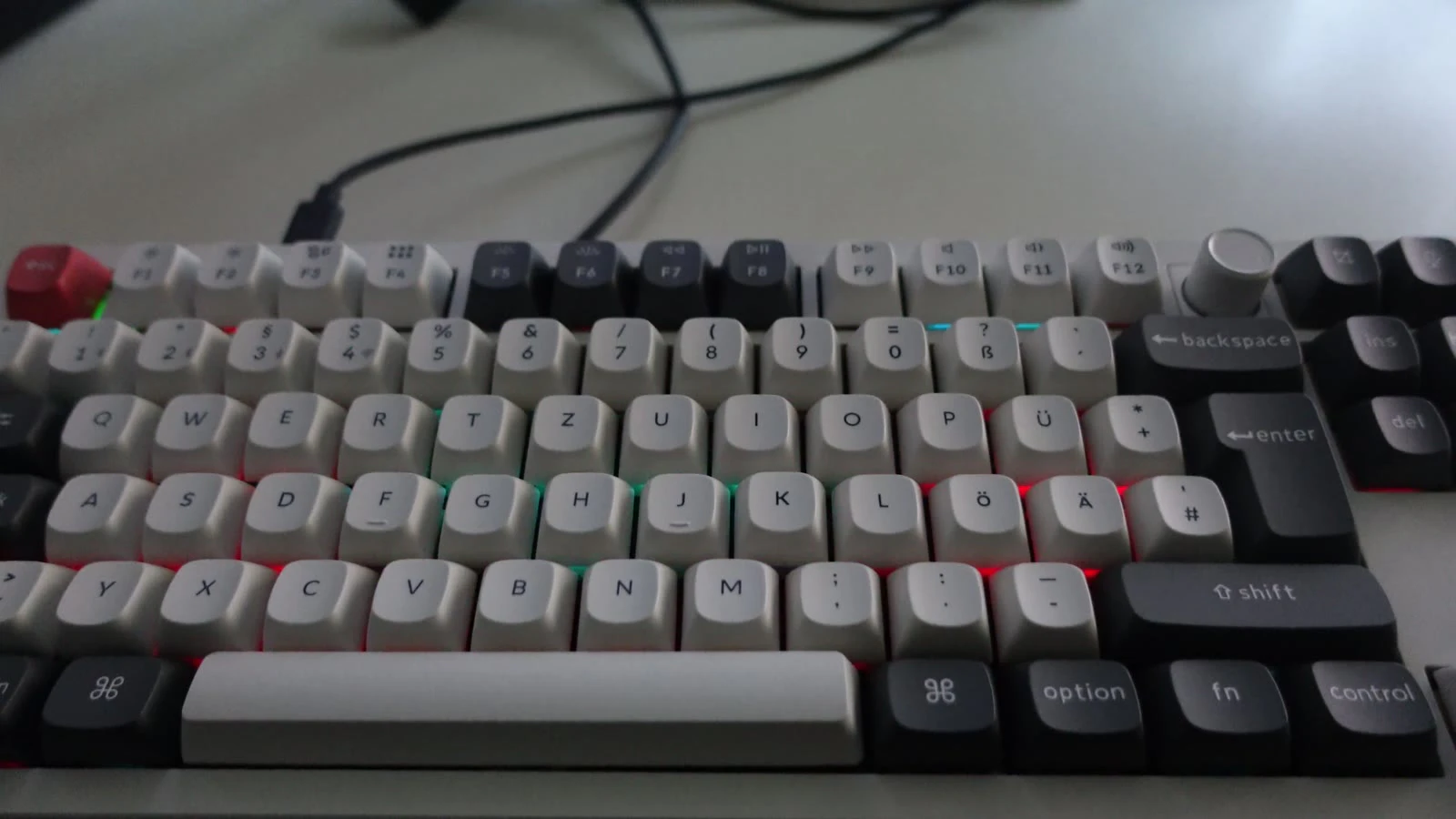
Tina's keyboard now rains. And, well, here's how we ended up here.
Tina doesn't believes in “good enough”
Tina has this habit of poking at things until she understands how they work. Which is great, except sometimes she discovers something that's broken, decides it shouldn't be and now we're all involved.
This time, it was a keyboard.
She recently bought a Keychron Q6 Ultra 8K and while we were hanging out, she brought up how bizarrely bad its stock RGB effects were. Now, for a keyboard that costs around €300, you'd think the lighting effects would be at least… decent?
Apparently, that was asking too much.
But Tina's idea of a good effect wasn't simply something that looked “pretty” or made the keyboard glow in seventeen different shades of rainbow. She wanted a decent wave effect.
She wanted a wave effect that behaved like an actual wave. Press a key, and the resulting ripple should spread across the board, interfere with other ripples, form troughs and eventually settle. Not just play out some canned animation cycle that resets the moment you press another key midway through.
A rather reasonable expectation, you'd think. Right?
So naturally, she ended up simulating fluid dynamics on a keyboard.
The Ultra series is interesting because Keychron moved it off QMK. It runs ZMK on a Realtek RTL8762G, a Bluetooth chip clocked at 40 MHz that leaves 176 KB of RAM for the firmware (as per my *dubious* calculations).

Keychron publishes the firmware too …which is rarer than it should be and they deserve credit for it (the ISO shield we needed was another story but I'm getting ahead of myself).
It took three of us about two weeks of poking around and then four days of actually sitting down to do the thing. Tina came up with the idea, RGB effects she wanted, worked out the physics and built the Python simulation in one lunch break that became our reference. She and zvit made the toolchain stop fighting us. I ported her simulation into C until it ran on the board.
From a €300 keyboard to a physics problem
That's the rough sequence of events. The details, unsurprisingly, were a little messier.
Half a tree
Realtek keeps a ZMK fork (rtk_zmk) on top of their own Zephyr branch and Keychron's keyboards live in it as shields, one folder per board. Tina and Zvit went looking for hers and found the Q6 Ultra in ANSI. No ISO. The ANSI shield had been in the repo since May and the ISO one wasn't on GitHub at all.
The two layouts are close enough that Zvit tried deriving one from the other. A shell script copies the ANSI shield and patches it into ISO with a little Python. The extra key right of left Shift goes into the free matrix slot (row 4, column 1). The LED count goes from 108 to 109 and every LED index after the new key moves up by one. It's a reasonable guess. It's also a guess. Guessing a board's LED wiring from its sibling is how you get a keyboard that lights the wrong key. Or worse…

So we did some OSINT. It eventually led us to a guy in Germany and Zvit fired an email.
Few weeks pass by and turns out a whole tree had simply never been uploaded.
On September 30, Keychron's maintainer pushed a commit adding the ANSI, ISO and JIS shields for sixteen Ultra models. The Q6 ISO was one of them, luckily.
Moral of the story?
Sometimes the solution to a software problem really is emailing a human. Disappointing, I know.
West of the Nix
Before anyone gets to write an effect, the firmware has to build.
Zephyr builds with west, a Python meta-tool that clones a manifest of repositories, pins them and then drives CMake for you. Realtek's documentation fits the setup in five lines (the board and shield here are the ones from Tina's flake):
git clone --branch rtk_zmk https://github.com/rtkconnectivity/zmk.git
west init -l zmk/app
west update
cd zmk/app
west build -p -b keychron -- -DSHIELD=keychron_q6_ultra_iso
On a normal distro, that's an afternoon of pip and SDK tarballs. On NixOS, it's a different afternoon. West wants a Python environment with itself and pyelftools inside, the Zephyr SDK wants its toolchains where it expects them and west update wants the network in a build sandbox that doesn't have one. Tina's original flake had a rather honest #broken next to that last bit.
Tina and Zvit worked through that in the meantime. They got west and its Python toolchain working under Nix, sorted out the configuration the Realtek tree expects and wrote the udev rules that let a normal user open the keyboard's /dev/hidraw nodes.
A lot of this work never gets a clever commit, a pretty demo or hell… never even gets a mention in the eventual write-up (if there is one). It just quietly disappears into the background and before long, nobody remembers how much effort went into making things just work. But it's precisely why the rest of us could run west build and get a .bin instead of a stack trace.
The latest flake takes a different approach. It fetches Zephyr and all the west modules in a fixed-output derivation and then freezes the manifest to exact commits. Nix can verify the fetched sources against their expected hash and the actual firmware build can run without touching the network.
A pool in matplotlib
Then came a lunch break. Tina sat down and hacked together the effect she actually wanted in Python. Somewhere between working through the wave equation, solving differential equations and getting the simulation to behave, she also fell down a little numerical-analysis rabbit hole: the finite-difference method and the century-old mathematical ideas behind it. The Courant–Friedrichs–Lewy condition, in particular, turned into a bit of a history lesson for the three of us.
The first iteration was about 70 lines of numpy and matplotlib. The algorithm walkthrough goes a little like this,
Imagine, the keyboard is made up of 20 by 6 cells and each cell is oversampled ten times in each direction. The water is a 200 by 60 grid. A click adds a Gaussian hill at the mouse. Every frame runs two steps of the damped wave equation and the plot shows the grid averaged back down to 20 by 6 with a red/blue color map.
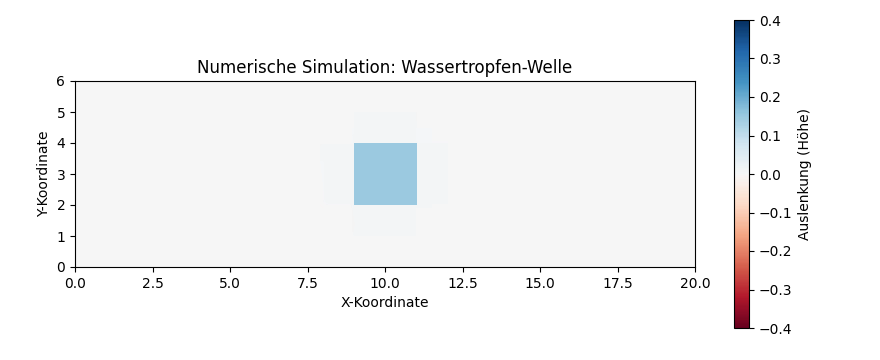
Höhe means “height”. I think? Look at us! Doing physics while picking up German along the way :P
The heart of it is three lines:
laplacian = (np.roll(z, 1, axis=0) + np.roll(z, -1, axis=0)
           + np.roll(z, 1, axis=1) + np.roll(z, -1, axis=1) - 4 * z)
z_next = (2 * z - z_prev + r_factor * laplacian) * d
z_prev, z = z, z_next
Every cell keeps moving the way it was moving, gets pulled toward the average of its four neighbors and loses 1% to friction. That's the whole physics. It looked elegant. Which was the problem… the reference was a 12,000-cell float simulation and the target was a 40 MHz chip with no FPU we could safely use from the RGB thread (which I learned painfully).
It was so exciting that the three of us sat down and started hacking away on the port.
Flashing without the Launcher
The stretch of work started with the least glamorous problem. Our firmware needed a way onto the board.
Keychron updates these boards from the Keychron Launcher, a web app that talks to the keyboard over WebHID. That's fine for Keychron's firmware and useless for ours.
So Tina wrote flash.py. It's a port of the Launcher's Realtek update routine, read out of the Launcher's JavaScript and checked against the device side (app/src/dfu/tdfu.c). It finds the keyboard by Keychron's vendor id and the DFU interface by its HID usage page (0x8C), then talks to it in 32-byte reports.
The protocol is pleasantly paranoid. The image never goes over the running firmware. It streams into a staging bank 16 bytes at a time with one ack per packet. Only after the keyboard has checked the CRC32 of the whole thing does IMAGE_SWITCH make it live. flash.py adds its own paranoia on top (of course). It refuses to send IMAGE_SWITCH unless the device reports the checksum as good. A bad upload never goes live and the old firmware keeps running.
Flashing didn't work on the first try either. One upload died 5,665 packets in and all flash.py could say was no ack at chunk 5665/19014. The image was fine. OpenRGB and Artemis were both streaming colors to the keyboard over raw HID at the time and the firmware was too busy answering them to ack the update. With nothing else attached the same image went through clean. flash.py now looks for any other program holding the keyboard open and refuses to start until it's closed.
First light
Tina wrote an effect as soon as there was a build and a way to flash it. RGB effects in this tree are QMK's RGB matrix effects ported to ZMK. Each one is a function the RGB thread calls per frame for a range of LEDs. Hers is called waves and it's the trans flag in five stripes over the six matrix rows. Every key press scrolls it one row.
It's thirty-odd lines and it proved what mattered. The custom build boots, still types and draws what we tell it. It also bumped LED_HITS_TO_REMEMBER from 8 to 108 on the way. That's how many recent key presses the keyboard remembers for reactive effects like Splash. A press stays on that list for about a minute. With 8 slots a quick burst of typing shoves out presses whose splashes are still running. With 108, about one per key, even a burst across the whole board fits.
Things I tried first
I'll be quick about these because none of them shipped.
The first idea was to skip the grid entirely. Treat each LED as a node, connect it to every LED within 1.6 keys with a weight of one over the squared distance and run the same update on one node per LED instead of thousands of cells. It's cheap and it does ripple. It also ripples like a bag of marbles. The LEDs aren't on a regular lattice and the irregular spacing shows in every wavefront.
The second was to skip the physics. A ripple is basically a ring moving outward. Precompute a radial profile (a Gaussian envelope times a sine) into a 1,024-entry table and look it up by distance minus speed times age. No sin() or exp() per frame. Lovely in a preview. It's also a picture of a ripple and not a ripple. Nothing reflects off the edge of the board, two rings pass through each other without interfering and it was not what Tina had in mind.
Looking back, this was also me getting carried away with premature optimisation before we even had a working effect. Zvit, bless him, humoured my shenanigans while theory-crafting about the wave physics and walking me through shallow-water equations (SWE).
Tina's script was the look we all ultimately wanted. So the job became making the grid fit.
Piss poor port!
I started with a rather crude port of Tina's simulation, giving each key just one cell to work with. 132 cells in total. I figured we'd start cheap and work our way up (famous last words).
It flickers. A drop one cell wide is a spike and a spike barely travels on a grid that coarse. The key flashes and its neighbors twitch and that's it. With dt held at 0.05 the coupling r = (c * dt / dx)² comes out at 0.0025 per step. That's almost none.
Click any of the three above. All of them get the same drop at the same key. The bottom one is Tina's reference at ten cells per key. The middle one is the firmware at four, running the code from the board. The top one is where I started.
Four cells per key turned out to be the knee. The ring moves outward properly and on a PC test against Tina's original script with the real Q6 key positions a typical LED lands about 2 brightness steps off out of 255. One cell per key was off by 200 to 350 at worst. Ten cells per key would need 103 KB of RAM for the two grids. Four needs 16.9 KB.
| cells per key | grid | RAM (two grids) | cell updates per second |
|---|---|---|---|
| 1 | 22 × 6 | 1.5 KB | ~9,000 |
| 4 | 88 × 24 | 16.9 KB | ~126,000 |
| 10 | 220 × 60 | 103 KB | ~840,000 |
Naturally, one cell per key wasn't cutting it so I went back and made the simulation a little less terrible. About ~72 minutes later, I had a version doing roughly 14× the work of the first one.
Four cells per key it was, then. You win some, you lose some and sometimes you settle for 16.9 KB of RAM because the alternative is asking a tiny Bluetooth chip to perform miracles.
Inside the rain
Getting the grid to look right was one thing. Getting it to behave on a 40 MHz chip without blowing through the RAM was another. Turns out, there's a little more to making it rain than one might hope.
Where each key sits
The pool is 22 keys by 6 keys at 4 by 4 cells per key. That's 88 by 24 cells, two copies of it (now and one step ago) and a border ring of cells pinned at zero that waves bounce off like the wall of a pool.
The keyboard already knows where its LEDs are. Every shield ships a table of LED positions (g_led_config.point) where x runs 0 to 252 and y 0 to 61, about 12 units per key. Each LED maps to the grid corner nearest its real position and its key's own 4 by 4 block sits around that corner. Esc lands on corner (2, 2) and its block touches the wall.
One drop, two tables
A press adds make_drop() from the Python under the key. A Gaussian of width half a key covering 14 by 14 cells. exp(-4(dx² + dy²)) is exp(-4dx²) times exp(-4dy²). The firmware stores seven numbers for one side of one axis and multiplies a row value by a column value. The drop goes into both copies of the grid. Equal copies mean zero velocity. The hill appears standing still and then falls. Python does the same with z += drop; z_prev += drop.
The step
For every cell inside the wall:
int32_t lap = z[y - 1][x] + z[y + 1][x] + z[y][x - 1] + z[y][x + 1] - 4 * u;
// (2u - z_prev + r * lap) * damping
int64_t next = (int64_t)(2 * u - z_prev[y][x]) * 65536 + (int64_t)RIPPLE_R * lap;
z_prev[y][x] = (int32_t)((next * RIPPLE_DAMPING + (1LL << 31)) >> 32);
2u - z_prev is “keep going the way you were going”. r * lap pulls each cell toward its neighbors with r = 0.04. The 0.99 is friction. The new value goes straight into the old buffer because each cell reads its own old value exactly once right before overwriting it. Then ripple_cur ^= 1 swaps which buffer means “now”. No copy.
A piggy bank for time
Tina's script runs a step every 15 ms. The keyboard draws a frame every 18 to 20 ms. Those don't divide. The firmware saves time up and spends it:
uint32_t elapsed = MIN(g_rgb_timer - ripple_last_ms, RIPPLE_MAX_CATCHUP_MS);
ripple_acc += elapsed * (rgb_matrix_config.speed + 129);
while (ripple_acc >= RIPPLE_STEP_MS * 256) {
    ripple_step();
    ripple_acc -= RIPPLE_STEP_MS * 256;
}
At the default speed of 127 the budget grows by 256 per millisecond and a step costs exactly 15 ms. Most frames get one step and about every fifth gets two. The leftover carries over so it never drifts. The speed keys still work (about half speed at 0 and one and a half at 255) and the 120 ms cap stops a fast-forward after the lights were off.
Pennies, not dollars
None of this is floating point. This build doesn't save the floating-point registers when threads switch. A float on the RGB thread could get stomped by whatever interrupts it. Every height is an integer counted in 65536ths instead. That's Q16. RIPPLE_Q(0.99) is 64881. The compiler works it out and only whole numbers reach the chip.
The smallest step Q16 can hold is 0.000015. One LED brightness step is 0.4 / 255 = 0.0016. That's a hundred times finer than anything you can see. Multiplying two Q16 numbers gives 32 fraction bits. That's why the step does its sum in 64 bits and rounds once at the end with >> 32.
A sticky note on the fridge
Two threads touch the effect. The key scanner runs when a key changes. The RGB thread draws frames. The scanner only writes the pressed LED's number onto a 16-slot list and goes back to scanning. The RGB thread copies the list and empties it under a spinlock …then does all the math without it.
On a single core a spinlock just masks interrupts for the length of a 16-byte copy. Without it a press lands while the list is being emptied and you lose a ripple or get a ghost one.
Water to light
Each LED shows the mean of the 16 cells in its block, the same as Tina's downsample(). Above calm is your chosen hue. Below calm is the hue plus 128, the opposite side of the color wheel. That's how the firmware copies the red/blue color map of her plot. Brightness is |z| / 0.4 capped at full. Anything past 0.4 either way is full on and calm water is dark. In the video Tina's hue is red and the troughs are cyan.
What's missing
It runs on the board. It also has edges.
- Corner and edge keys are a bit dimmer. The wall is part of their block. Esc right after a press is about 25% dimmer than in the original simulation.
- The pressed key wobbles between colors while the ring spreads. The way the 0.99 is applied acts a little like a spring. We decided that it's charming.
- It can't be part of the Mixed RGB mode. That mode only takes effects numbered below it and ripple is 26.
- The Keychron Launcher has no name for effect 26. You reach it by cycling effects with Fn. We're living the custom firmware dream.
The firmware and Tina's flake are on her GitHub. If you have an Ultra board, build it for your shield, run flash.py handshake first and close OpenRGB before you flash.
Tina's script will remind you anyway. We've made enough mistakes on your behalf.
And that's about it. We started with Tina wondering why a €300 keyboard couldn't manage a decent wave effect and ended up solving a damped wave equation in integer arithmetic on a 40 MHz chip.
Is it perfect? No. Does Esc still get the short end of the pool? Maybe.
Will we make it even better over time? Probably.
Now, Keychron, if you're reading this: you already make the hardware and you publish the firmware (for which, genuinely, thank you).
How about giving the stock RGB effects the same attention? We'd quite like to see this make its way into the official firmware and… preferably, get a proper name in the Launcher!

Tina wanted a wave effect that behaves like actual water. We have one. It runs on your keyboard.
Seems a shame to keep it to ourselves, doesn't it?
 Wrong Boot (codename: wrong8007)
 Have a jalebi.
 Introducing Palindrick